
Make e-Invoicing Simple: Getting ready for e-Invoice Implementation
Step 1: Determine Your Implementation Timeline
E-Invoicing in Malaysia is mandatory for all businesses conducting taxable transactions.
The implementation is phased based on annual revenue, covering all industries:
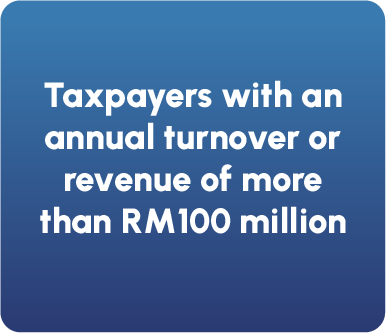
Start by
1 August 2024
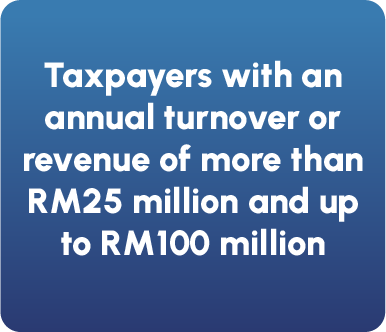
Start by
1 January 2025
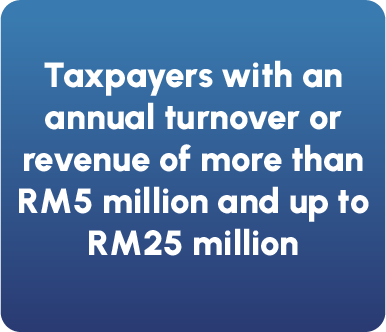
Start by
1 July 2025
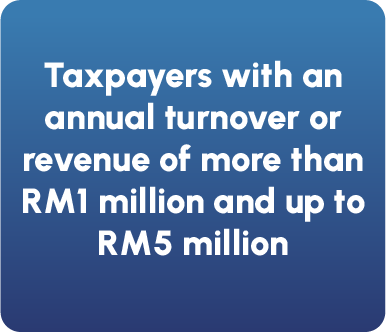
Start by
1 January 2026
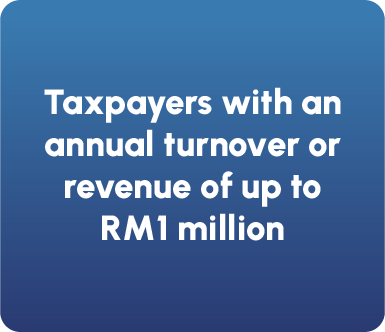
Start by
1 July 2026
💡 Important Notes:
- The revenue threshold is based on the financial year 2022, determined from either audited financial statements or tax returns.
- Once assigned an implementation timeline, businesses must comply, even if their revenue changes in later years.
- Businesses can choose to adopt e-Invoice earlier on a voluntary basis.
- For new businesses starting in 2023-2024, the implementation follows these rules:
- If revenue exceeds RM500,000, start by July 2025.
- If revenue is below RM500,000, start by January 2026.
- For new businesses starting in 2025 onwards, the deadline is January 2026 or the commencement date—whichever comes later.
👉 Action: Find out your business revenue category and prepare early!
Who Must Implement e-Invoicing?
To determine if your business needs to implement e-Invoicing, consider these situations:
- Individual Companies – If a company’s annual turnover exceeds RM150K, it must implement e-Invoicing.
- Multiple Companies Under the Same Owner – If a business owner has multiple companies, their combined revenue is considered together. If the total revenue exceeds RM150K, e-Invoicing is mandatory.
- Affiliated Companies & Joint Ventures – Companies under joint ventures or affiliated structures must combine their revenues. If the total exceeds RM150K, they are required to implement e-Invoicing.
- Companies Below the Threshold – If a company’s total annual turnover is below RM150K, e-Invoicing is not required.
💡Key Takeaway: If your business or group of businesses crosses the RM150K annual turnover threshold, start preparing for e-Invoicing now to stay compliant.
Who is Exempted from e-Invoicing?
Certain entities are exempted from issuing e-Invoices, including:
✅ Foreign diplomatic offices
✅ Individuals who are not conducting business
✅ Statutory bodies, authorities, and local authorities (for specific collections and pre-1 July 2025 transactions)
✅ International organizations (for pre-1 July 2025 transactions)
✅ Businesses with an annual turnover below RM150K
💡 Special Cases:
🔹 Suppliers selling to exempted entities must still issue e-Invoices.
🔹 Entities owned by exempted persons (e.g., companies under a statutory body)
must follow the e-Invoicing timeline.
🔹 Exempt persons can still voluntarily adopt e-Invoicing to support digital transformation.
🚫 No e-Invoicing is needed for certain types of income, including:
❌ Employment income, pensions, alimony, zakat
❌ Certain dividend distributions and securities transactions
🔍 Note: Exemptions may be updated by LHDN from time to time.
Step 2: Understand the E-invoice Process Flow
The e-Invoice workflow outlines the entire process, starting from the point of sale or transaction.
✅ Supplier Issues an e-Invoice – Sent via the MyInvois Portal or API
✅ Validation Process – The e-Invoice is reviewed and confirmed
✅ Secure Storage – All validated e-Invoices are stored in the IRBM database
💡 Why It Matters?
🔹 Ensures seamless compliance with tax regulations
🔹 Enables easy access to historical e-Invoices for taxpayers
🔹 Supports efficient digital record-keeping
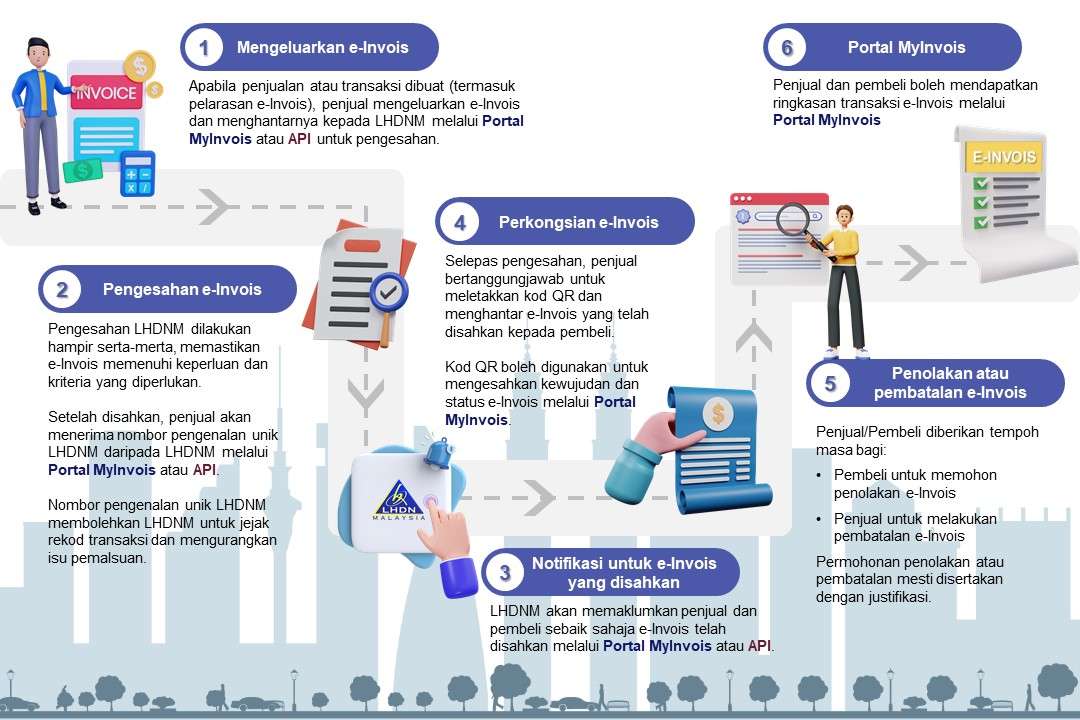
E-Invoicing Process for B2B Transactions
- Issuance: The supplier generates an e-Invoice and submits it to IRBM through the MyInvois Portal or an integrated business system via API.
- Validation: IRBM conducts real-time validation of the e-Invoice and assigns a Unique Identifier Number (UIN) upon approval.
- Notification: Once validated, both the supplier and buyer receive notifications from IRBM confirming the successful processing of the e-Invoice.
- Sharing: The supplier provides the buyer with the validated e-Invoice, which includes a QR code for easy access and verification.
- Rejection/Cancellation: The buyer has up to 72 hours to request a rejection, while the supplier can cancel the invoice if necessary. Any modifications or rejections must be supported with proper justification.
- Human-Readable Format: After validation, the supplier may share a readable version of the e-Invoice in PDF or JPG format for convenience.
E-Invoicing Process for B2C Transactions
Scenario 1: Buyer Requests an E-Invoice
- The seller gathers the necessary buyer information.
- An e-invoice is generated and submitted to IRBM for validation.
- Once approved, the validated e-invoice is provided to the buyer for their records.
- The seller issues standard receipts or invoices at the point of sale.
- At the end of each month, these transactions are consolidated into a single e-invoice.
- The compiled e-invoice is then submitted to IRBM for validation.
- Buyers who do not request an e-invoice may not have tax documentation for those transactions.
Simple Steps to Register for MyInvois on MyTax 🚀
🎥 Watch the step-by-step video guide here:
- Access the MyTax Portal
- Log in using your Tax Identification Number (TIN) or register if you don’t have one.
- Register Your Business
- Navigate to the MyInvois section and complete the business registration.
- Verify your email and business details with IRBM or your tax agent if you don’t have a login.
- Provide Business Information
- Business Name & Registration Number
- Taxpayer Identification Number (TIN)
- Business Address & Contact Details
- Industry Classification (e.g., retail, F&B, manufacturing)
- Appoint a System Administrator (Optional)
- If the business owner manages e-Invoicing independently, no additional authorization is required.
- If the business owner manages e-Invoicing independently, no additional authorization is required.
Refer to the video link below for how to assign representative:
👉 Pro Tip: Make sure your company details and tax status are updated!