Spread knowledge—share this with your community!
Edit Template

Beyond the Invoice:

Overcoming the Biggest Hurdle in
E-Invoice – Collecting Customer
TIN/BRN

Beyond the Invoice:

Overcoming the Biggest Hurdle
in E-Invoice – Collecting
Customer TIN/BRN

The New Reality of Customer Data

Malaysia’s e-Invoicing rollout has reshaped how businesses manage customer information. Under the phased implementation, only companies exceeding LHDN’s annual turnover threshold are required to issue e-Invoices during their rollout stage.

For these businesses, compliance goes beyond system setup—it requires time and coordination to collect accurate buyer details such as Tax Identification Number (TIN), Business Registration Number (BRN), or Identity Card (IC) for individual clients or suppliers.

This has become one of the most time-consuming challenges, shifting data collection and verification from the back office to the sales and customer service front lines.
The below is the e-invoice implementation timeline.
Targeted Taxpayers Implementation Date

Taxpayers with an annual turnover or revenue of
more than RM100 million

1 August 2024

Taxpayers with an annual turnover or revenue of more than RM25 million and up to RM100 million

1 January 2025

Taxpayers with an annual turnover or revenue of more than RM5 million and up to RM25 million

1 July 2025

Taxpayers with an annual turnover or revenue of more than RM1 million and up to RM5 million

1 January 2026

Taxpayers with an annual turnover or revenue of up to RM1 million

1 July 2026

The Obstacle at the Front Line

The primary challenge is one of public perception and friction in the sales process:
  • Customer Resistance/Friction: Some customers & individuals are often hesitant to share their IC or TIN/BRN for a routine purchase due to privacy concerns or simply the extra time required.
  • Data Inaccuracy: Even when data is provided, there is a high risk of input errors Submitting an e-invoice with an incorrect or unverified TIN/BRN will lead to rejection by the MyInvois system.
  • Non-Mandated Clients: Dealing with clients (especially foreigners or individuals) who do not have a standard Malaysian TIN/BRN adds complexity, requiring knowledge of the specific General TIN codes designated by the IRBM.

How to Verify Customer Information Accurately?

To tackle these obstacles, businesses need to implement a streamlined, front-end verification process. This not only ensures immediate compliance but also minimizes the administrative burden on the accounting team later.
A)How to Find a Company’s TIN using MyData-SSM and MyTax:
  1. Obtain the Business Registration Number (BRN): Go to the MyData-SSM website (mydata-ssm.com.my) and register an account.
  2. Search and Retrieve BRN: Use the search bar on MyData-SSM to search for the company name (e.g., ANC Group Sdn Bhd). Click on the company name to view the profile and copy the new company registration number.
  3. Verify the TIN on MyTax: Go to the MyTax portal (MyTax.hasil.gov.my).
  4. Access the Search Function: Click on the “Search TIN” function.
  5. Input Data:
    • Under “Please Choose Category,” select the relevant entity type (Company (C), Partnership (D), Limited Liability Partnership (PT), etc.).
    • Paste the copied registration number (BRN) into the field for the Reference Number.
  6. Retrieve TIN: Click “Search”. The system will display the company’s official Tax Identification Number (TIN).

B) Handling Individual Taxpayers (B2C):
For individual customers, obtaining the IC number is essential, as the TIN is directly linked to it. The system cannot perform a TIN search for individuals without their IC number.

  • Requesting IC/Passport: For transactions requiring an e-invoice, businesses must clearly communicate to individual customers that their Identity Card (IC) number (or Passport number for foreigners) is required for them to receive a validated e-invoice for tax claim purposes.

C) Final Accuracy Check:
If a customer provides a TIN but you are unsure of its validity, you can use the MyTax portal’s payment section (ByrHASiL.hasil.gov.my) to attempt a tax payment search using the number, which can often confirm if the TIN is active and correct before finalizing the e-invoice submission.

Streamlining the Process: Software Integration and Automation

Compliance is made significantly smoother by integrating the customer ID check directly into the business’s existing accounting or ERP software.

A) Utilizing Commercial Accounting Software (UBS, Autocount, SQL, etc.)
Leading accounting solutions in Malaysia have updated their systems to address the e-invoicing data challenge.

  • Integrated Customer Master Data: These software updates allow businesses to permanently store the validated TIN, BRN, or IC within the customer’s master file.
  • Automated Validation: When an invoice is generated and pushed to the MyInvois system (via API), the software automatically retrieves the stored ID, minimizing manual data entry errors.
  • Seamless E-Invoice Generation: The entire e-invoice JSON file is generated automatically, including the correct customer ID, before submission to the IRBM.

💡How to setup E-invoice in Customer Maintenance? Refer here:

B) The Free Option: Direct Submission via the MyInvois Portal
For businesses with low transaction volume or those on a tight budget, the MyInvois Portal offered by the government is a free and functional solution.

While the MyInvois Portal is an accessible entry point, businesses must be aware that the need for manual submission and the lack of seamless integration with internal accounting and billing systems means the process is less efficient and more prone to reconciliation issues.

For robust and high-volume operations, a fully integrated commercial software solution remains the most practical choice.

Choosing the Right E-Invoice Solution

Successfully navigating the system hinges not just on the accounting process, but on the ability to efficiently collect and verify customer data. Choosing the right software based on your business size, transaction volume, and user skill set is critical:

Business Profile Ideal Solution Rationale
Micro/Small (Very Low Volume & Budget Sensitive)
MyInvois Portal

Best for budget issues and businesses with less transaction volume where the trade-off of manual entry is acceptable.

SME (Tier 3, UBS Experienced)
Access UBS

Suitable for businesses with experienced users who are familiar with the traditional UBS accounting foundation and prefer to build upon a known system.

SME (Tier 2 to Middle Tier 3, High Volume)
SQL Account

Ideal for businesses looking for a user-friendly system known for its robust features and quick retrieval of customer TINs, catering to a broad base of SMEs.

SME (Tier 2/Tier 3, Forward-Thinking)
Autocount

Suitable for businesses seeking a modern, high-technology system with advanced features like mobile solutions and automated tools for collecting and updating customer information.

💡 How Autocount, UBS and SQL handle self bill?

You may also like

dreamina-2025-12-12-6922-expand
Image_fx (4)
Image_fx (3)
dreamina-2025-11-10-4023-A Malaysian retail shop owner sitting at..
Background

You may also like

dreamina-2025-12-12-6922-expand
Image_fx (4)
Image_fx (3)
dreamina-2025-11-10-4023-A Malaysian retail shop owner sitting at..
Background

Copyright © 2025 Accounts In One.
All rights reserved.

Edit Template

Related Posts:
error: Content is protected !!
Scroll to Top

How does AutoCount handle the Batch Get TIN process in Debtor/Creditor Maintenance?

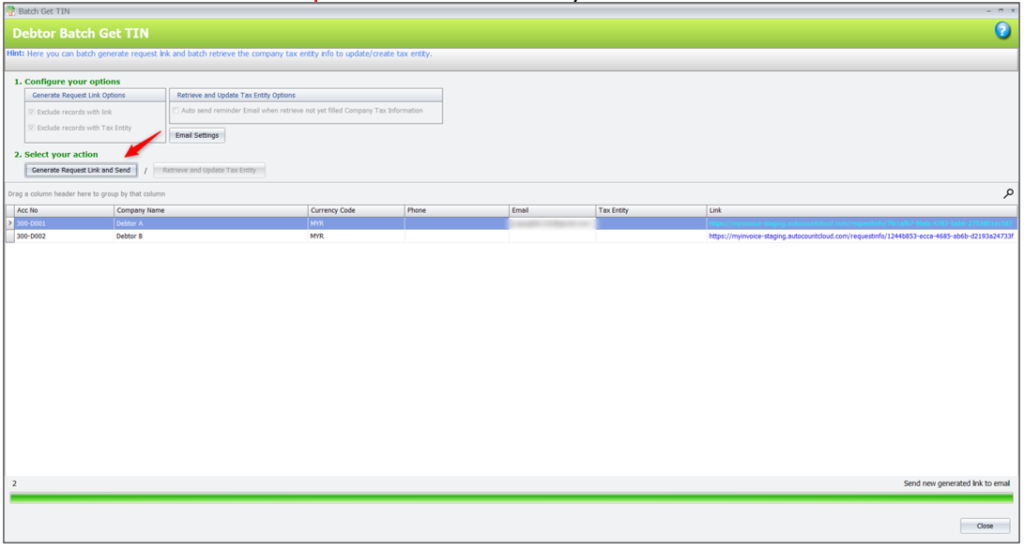
This feature enables users to request company details from multiple debtors required for Malaysia’s e-Invoice submission. It allows bulk requests, eliminating the need to contact each debtor individually.

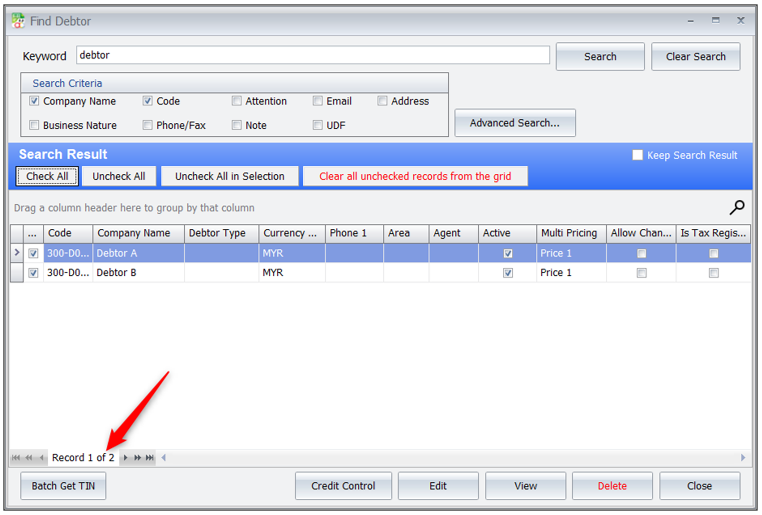
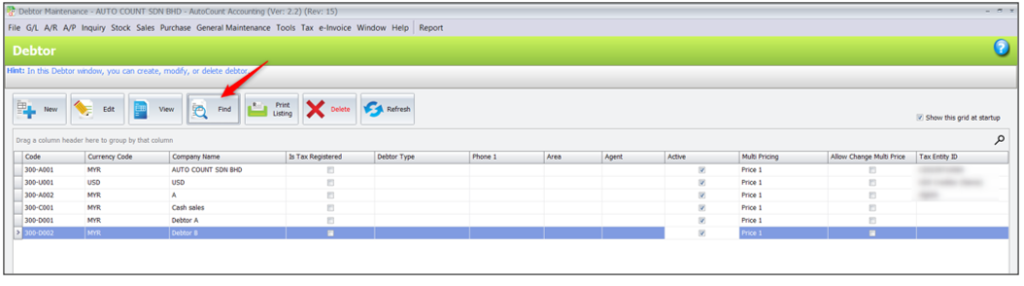
1.Go to AR > Debtor Maintenance > click on Find, filter out the debtor which TIN.No haven’t maintenance.

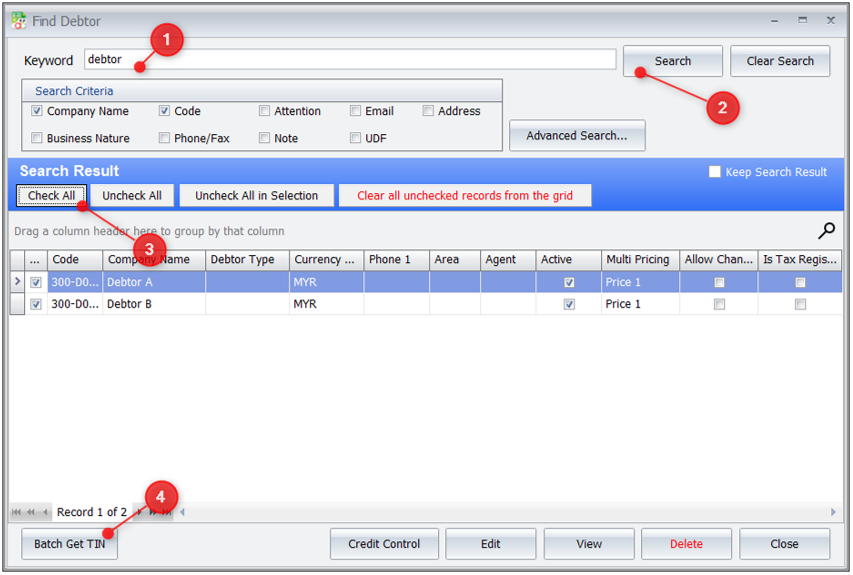
2. Search based on keyword. Check All, click on Batch Get TIN.

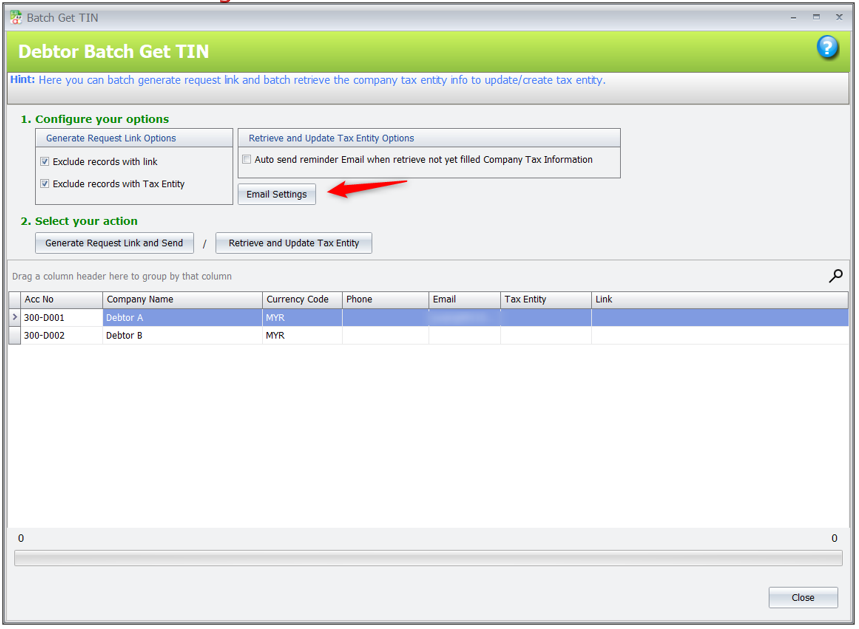
3. Click on Email Setting and fill in the SMTP server info.

4. Click on Generate Request Link and Send. System will send out the link via email.

5. Debtor will receive the email.

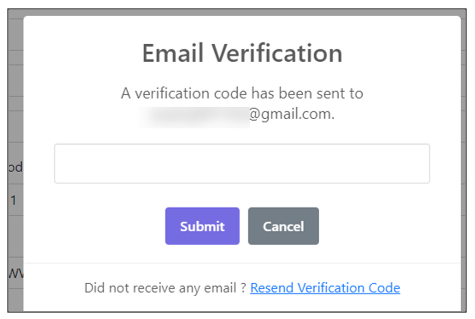
6. They need to click on the link, fill up the Company Tax Request Form. When they click on Submit, verification code will send to them and they need to key in the code to verify.

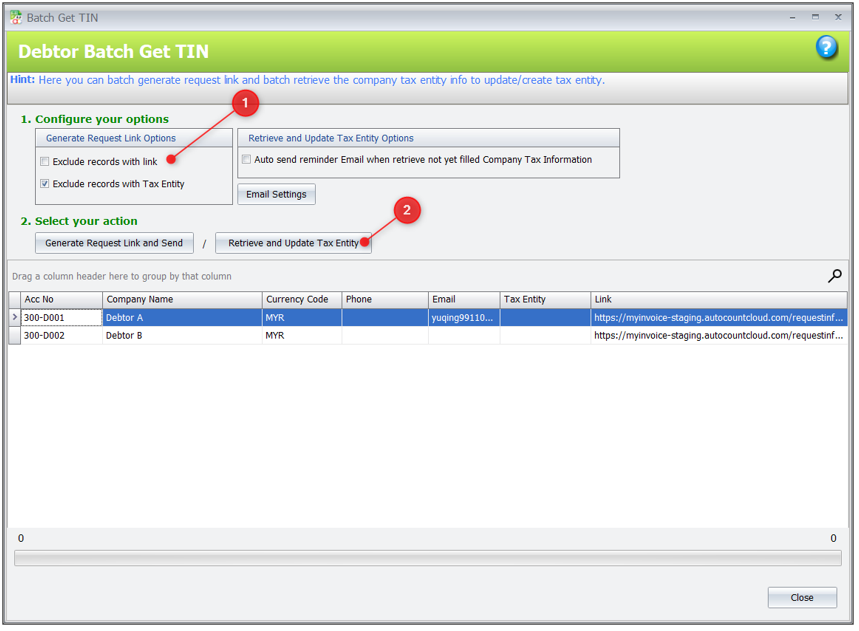
7. Now, you may go back to Debtor Batch Get TIN. Unselect Exclude records with link. Click on Retrieve and Update Tax Entity.

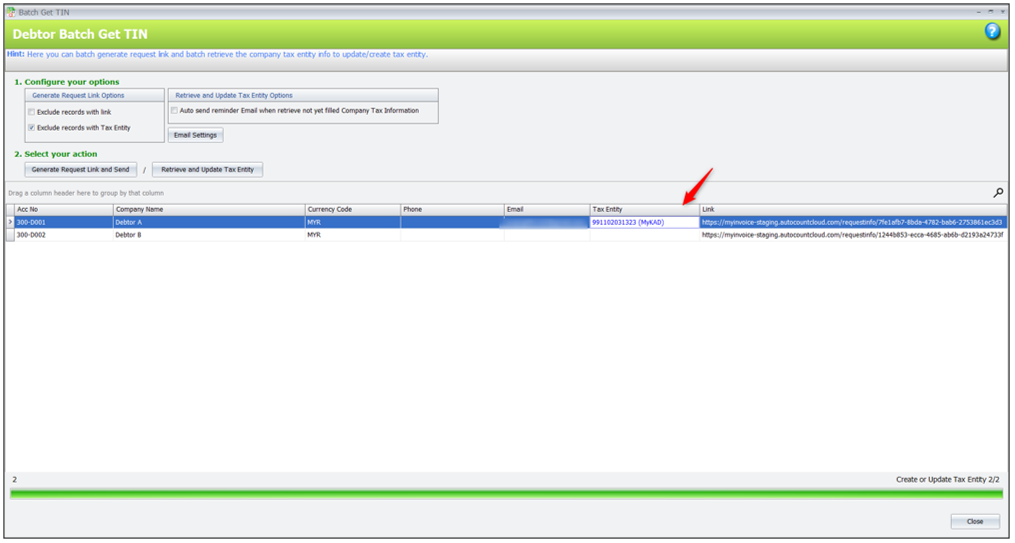
8. Tax Entity been updated.

9. You may also check the ‘ Auto send reminder Email when retrieve not yet filled Company Tax Information’, then click the Retrieve and Update Tax Entity.

10. System will help you to update the tax entity, and auto send reminder Email to customer who haven’t update their Company Tax Information.

Info Request in Debtor/Creditor Maintenance in SQL

This feature helps users easily gather complete and accurate company details from their customers or suppliers, particularly for Malaysia e-Invoice purposes. The system can generate a secure link that you can send via email, allowing recipients to fill in their company information directly.

Create Info Request

To generate an Info Request that allows customers or suppliers to submit their company information.

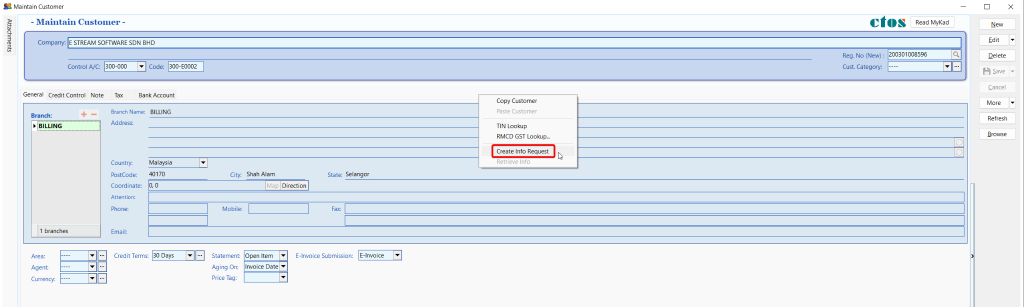
1.Go to detail mode for the selected customer or supplier

2. Right click on an empty space, click on Create Info Request

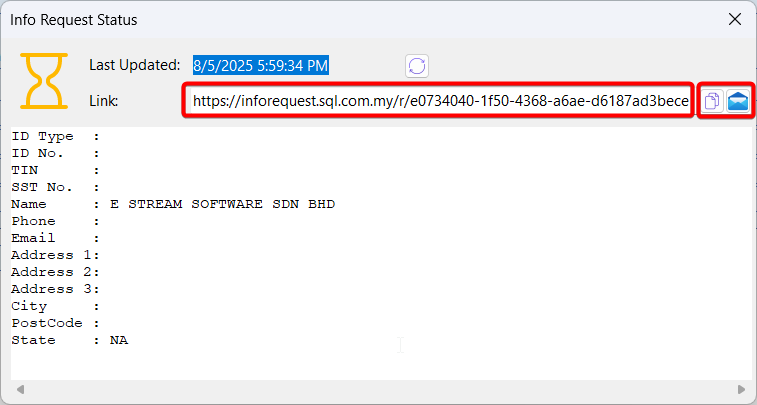
3. A dialog will appear showing a unique link. You can copy the link and share it manually or email it directly to the customer/supplier

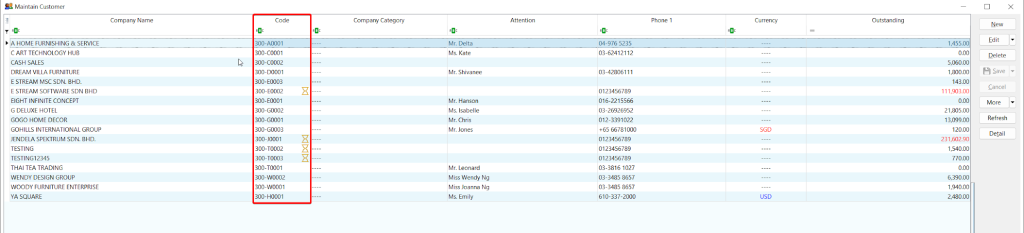
4. To retrieve and update information for multiple customers or suppliers at once

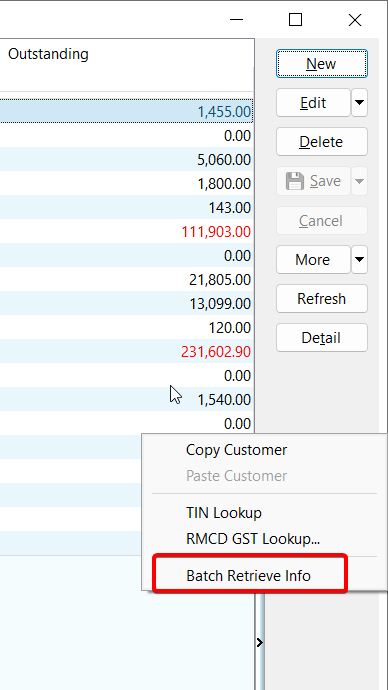
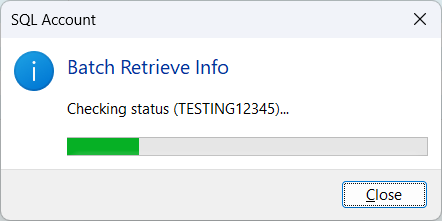
5. In the browse screen, right-click on the button panel, click on Batch Retrieve Info

6. A progress dialog will appear and automatically fetch the submitted data for all customers/suppliers

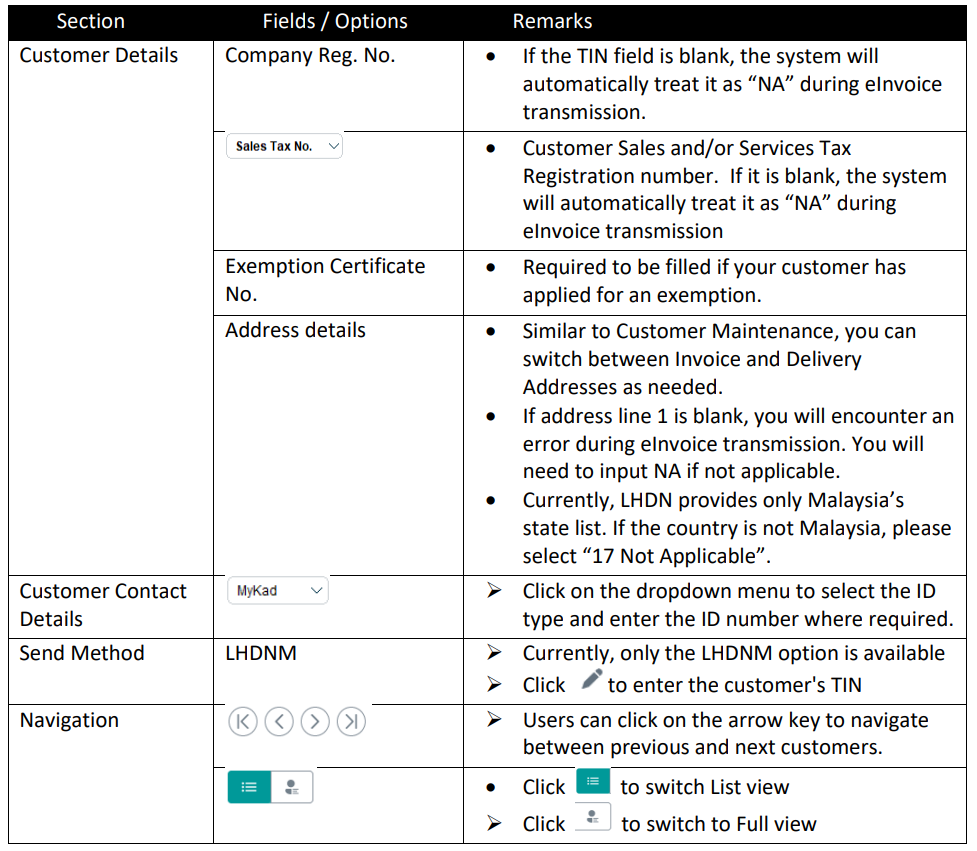
How does UBS update the TIN info for customer

In the current UBS software, there is no automated feature to generate and send TIN collection emails. Therefore, users may need to create a Google Form manually and share it with clients to collect the required information. Once the data is collected, users can export it to Excel and update the TIN, BRN, or IC accordingly by following the steps below.

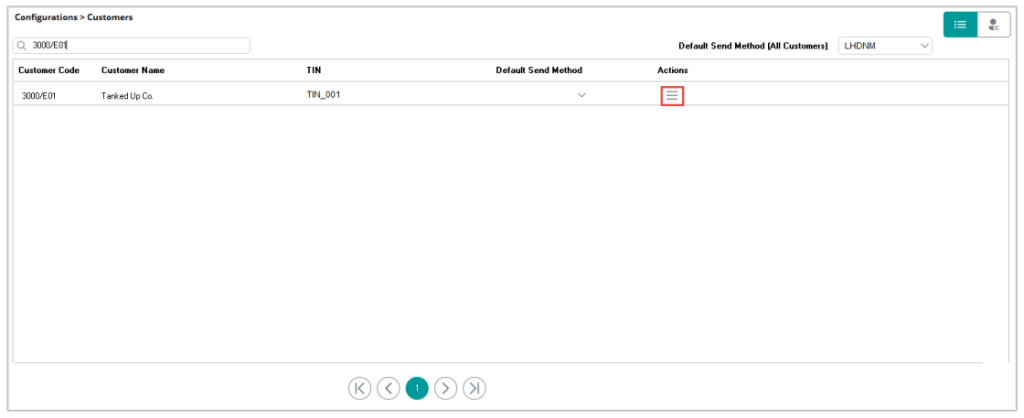
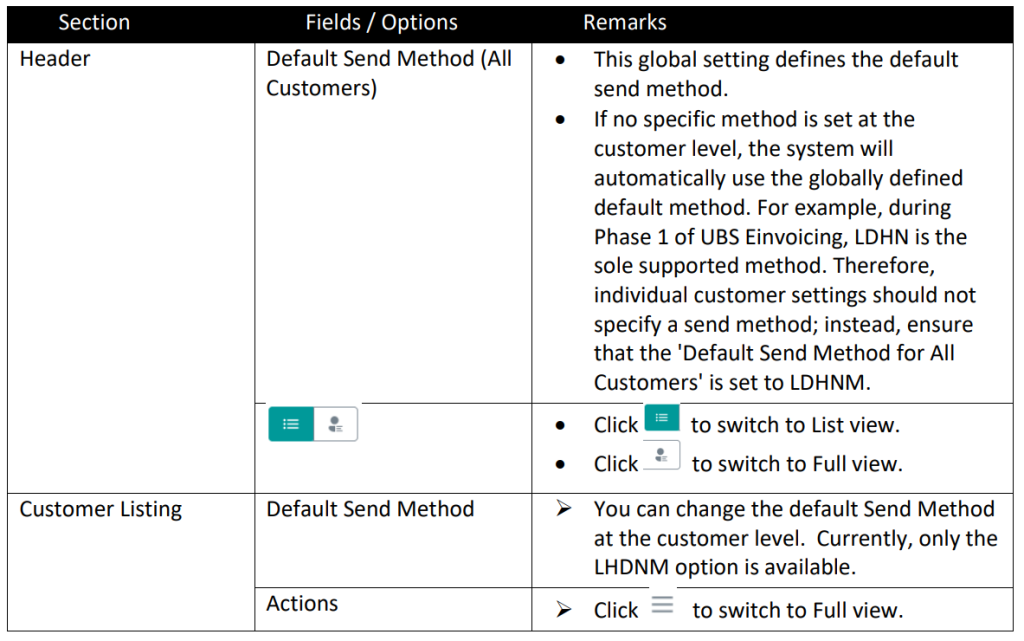
Customers

This screen automatically lists all customers from your Customer Master, providing a convenient overview of any missing details needed for e-Invoicing.

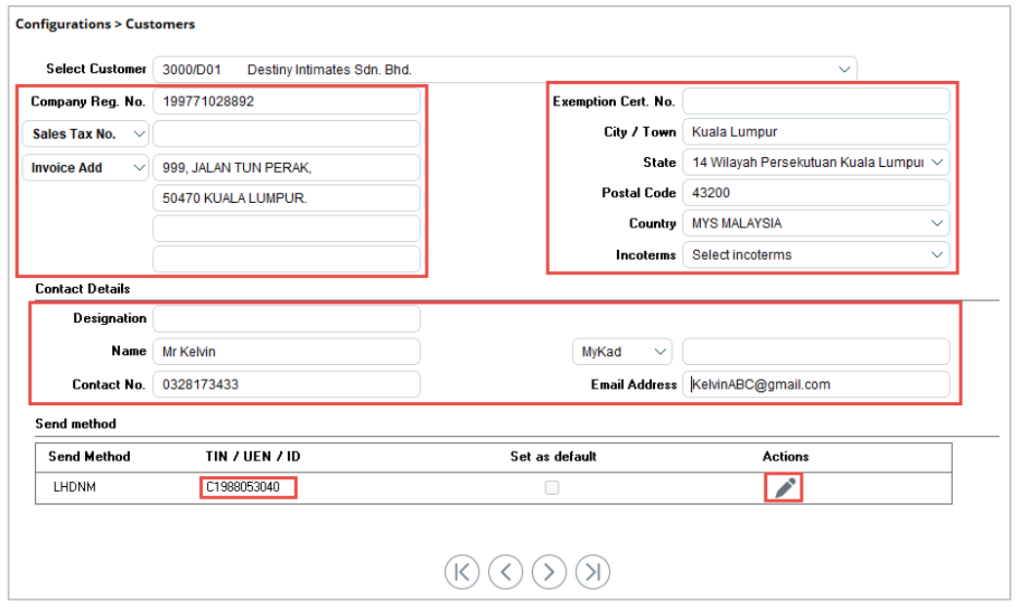
Click the icon under the Action column to begin updating the required customer information. The customer’s details will automatically appear on this screen. Ensure that all remaining fields are completed, as this data is essential for LHDN validation during the e-Invoice process.

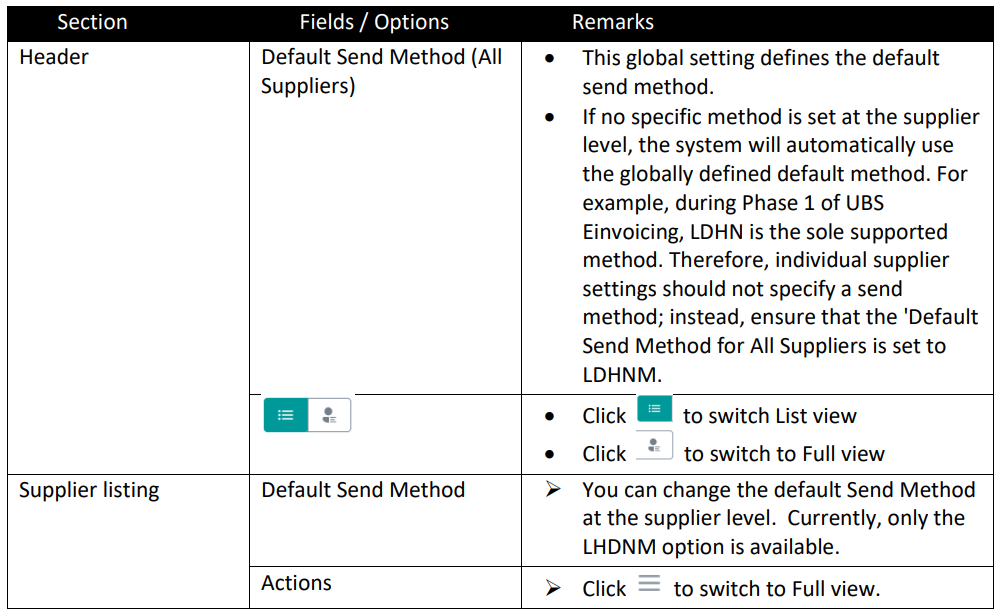
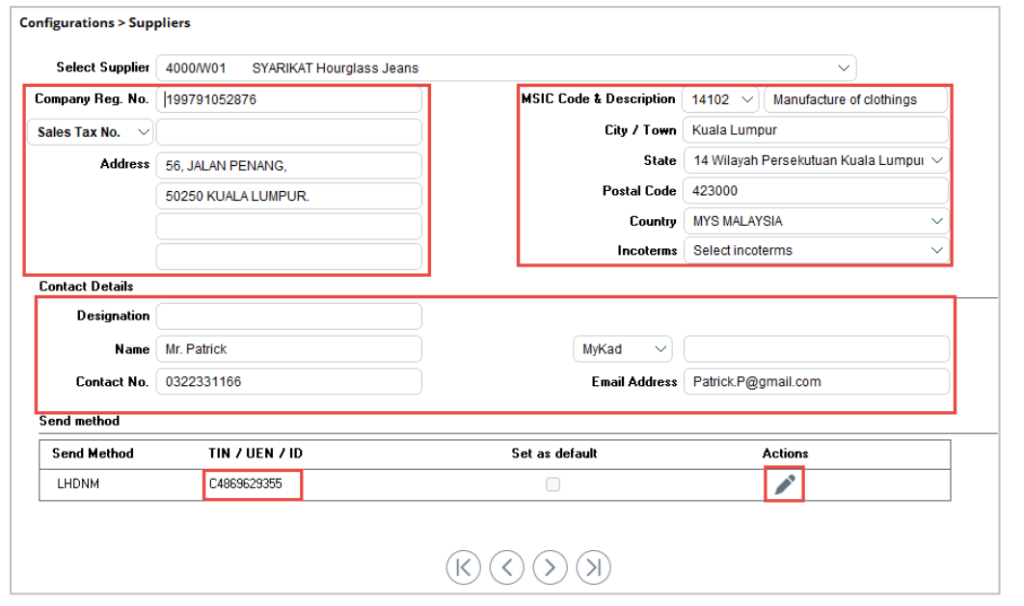
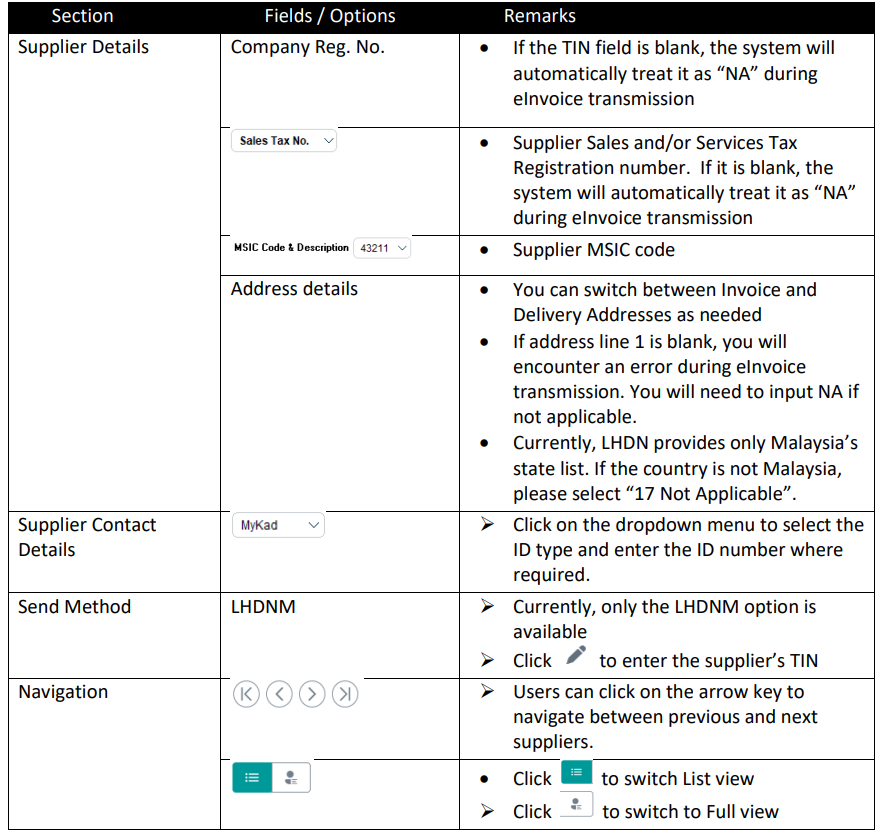
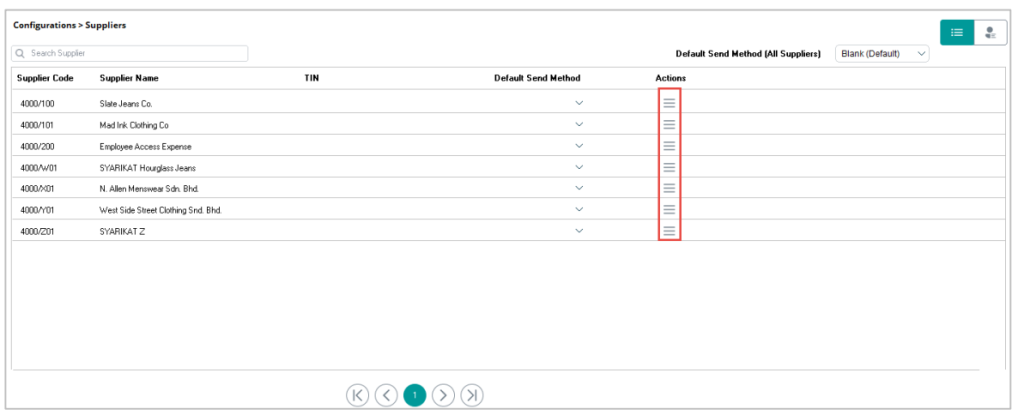
Suppliers

This screen automatically lists all suppliers from your Supplier Master, providing a convenient overview of any missing details required for e-Invoicing.

Click the icon under the Action column to begin updating the required supplier information. The supplier’s details will automatically appear on this screen. Ensure all remaining fields are completed, as this information is essential for LHDN validation during the e-Invoice process.